> ## Documentation Index
> Fetch the complete documentation index at: https://narev.ai/docs/llms.txt
> Use this file to discover all available pages before exploring further.
# How to choose an LLM model for your product
> A practical guide to picking the best LLM for your product when you don't have labelled data, comparing models on cost, quality, and task fit.
Follow along in [Google Colab](https://colab.research.google.com/drive/1wA8s3eY0-7QZeswXQhdZW5nRkdmOCMMU?usp=sharing) or [Kaggle](https://www.kaggle.com/code/oskarkocol/custom-llm-benchmark).
There are hundreds of Large Language Models available. This guide helps you **find the right one for your app**.
This guide assumes that you have some data to make the decision on (examples or past usage). If you
labelled your data, [check this guide instead](/guides/how-to-choose-llm-model-with-labels).
# Introduction to custom benchmarks
There is no shortcut. You need to run a benchmark or an A/B test to be able to tell which model to use.
This guide walks through the setup:
1. Send example prompts to a state-of-the-art model to establish a baseline with a Jupyter notebook.
2. Use Narev Cloud to find a model that performs like the baseline with lower cost and better latency.
3. Deploy the optimal model to production.
Before that, address a very common question.
## Why not use an LLM leaderboard instead?
LLM leaderboards show results from academic benchmarks. There are three reasons not to use academic benchmarks when making your decision on which model to use:
* **Academic benchmarks are a poor approximation of your app.** The leaderboards show scores that LLMs get on standardized tests. The promise is that strong benchmark scores transfer to production, but this often fails. A [3-year-old model can match a current state-of-the-art model](https://narev.ai/blog/gpt35-beats-gpt5) despite drastically different benchmark results.
* **Academic benchmarks aren't repeatable.** Benchmark results vary depending on who runs them. For example, GPT-4's score on the MMLU-Pro benchmark ranges from `72.6%` to `85.7%` depending on the leaderboard.
* **People game academic benchmarks.** For example, researchers document manipulation of Chatbot Arena in a [major study by Singh et al. (2025)](https://arxiv.org/abs/2504.20879). Data contamination is rampant (models that use benchmark questions in their training process). Read more about it [in our docs on benchmarking](/platform/concepts/benchmarks).
Now, when you measure your own benchmark, it fully reflects your use case, and no one can game it. Worth setting it up.
## Before you begin
To complete this guide, you'll need:
* A Narev account ([sign up here](https://narev.ai/login)) and a Narev API key ([get one here](https://narev.ai/api-keys))
* Python 3.8+ installed locally or access to Google Colab/Kaggle
* 50-100 example prompts representative of your production use case
* Basic familiarity with Python and Jupyter notebooks
* \~30 minutes to complete the setup and benchmarking
If you prefer not to use Python, you can upload prompts directly via the Narev dashboard or import from tracing
systems. [See data source options](/platform/benchmark/create).
# Setting up your benchmark
## Part 1: Create an A/B test endpoint on Narev platform
[Create new application](https://narev.ai/application/new) and select **Live Test** as your data source. You should get a URL that looks like this:
```
https://www.narev.ai/api/applications//v1
```
This is an endpoint that you can use like any OpenAI API compliant gateway (think OpenAI, OpenRouter, LiteLLM, Helicone, etc). It has \~500 models built-in.
**In addition** to giving you a response, it also saves your request for an A/B test. Neat.
## Part 2: Open and prepare the environment
This guide uses a short Kaggle and Google Colab notebook to get started. It uses [GSM8K benchmark data](https://huggingface.co/datasets/openai/gsm8k) from HuggingFace.
Start by importing libraries and setting credentials:
```python theme={null}
# Install required packages
import pandas as pd
import requests
from datasets import load_dataset
from kaggle_secrets import UserSecretsClient # or from google.colab import userdata
# Secrets
user_secrets = UserSecretsClient()
NAREV_API_KEY = user_secrets.get_secret("narev-api-key") # or userdata.get('narev-api-key')
NAREV_BASE_URL = "https://www.narev.ai/api/applications/cmj6nt7g40002i1qymlqvct4z/v1" # TODO: replace with your URL from Part 1
```
Store your API key securely as an environment variable, never hardcode it in notebooks.
We'll also define the **system prompt** and the **state-of-art** model to make the comparisons with.
```python theme={null}
# Variables
SYSTEM_PROMPT="""Solve the following math problem. Only include the number in your answer.
Give your final as a number.
Do not include any reasoning"""
STATE_OF_ART_MODEL="openrouter:google/gemini-3-pro-preview"
```
The system prompt is very simple here. We can iterate on the system prompts in the Narev platform to optimize further.
Finally, we'll load the `gsm8k` dataset. Here you should load the actual prompts that you would be using in your application.
```python theme={null}
dataset = load_dataset("openai/gsm8k", "main")
df_train = pd.DataFrame(dataset['train'])
df_test = pd.DataFrame(dataset['test'])
# take the first 50 prompts from the test
df_test = df_test.head(50)
print(f"First question:\n\n{df_test.iloc[0]['question']}")
```
Last thing is defining a helper function that will help us send the requests to Narev:
```python theme={null}
def send_to_llm(question: str) -> dict:
messages = []
if SYSTEM_PROMPT:
messages.append({"role": "system", "content": SYSTEM_PROMPT})
messages.append({"role": "user", "content": question})
try:
response = requests.post(
url=f"{NAREV_BASE_URL}/chat/completions",
headers={
"Authorization": f"Bearer {NAREV_API_KEY}",
"Content-Type": "application/json"
},
json={
"model": STATE_OF_ART_MODEL,
"messages": messages
},
timeout=60
)
response.raise_for_status()
data = response.json()
return data
except Exception as e:
print(e)
return {}
```
## Part 3: Send the requests to Narev
All that's left to do here is sending the requests to Narev. We'll select the state of the art model for this.
```python theme={null}
for question in df_test['question']:
print(f"Processing question: {question}\n")
response = send_to_llm(question)
if response.get('choices'):
print("Success\n\n")
else:
print("Failed to send a request\n\n")
```
## Optimization in the Narev platform
### Part 1: Select test Variants
When you head to the [Platform -> Variants page](https://narev.ai/variant), you should see an automatically created variant based on your request. Behind the scenes, the Narev platform took your requests to Gemini 3 Pro (defined as the `SOURCE_OF_TRUTH`) and created prompts that are now ready to run an A/B test on.
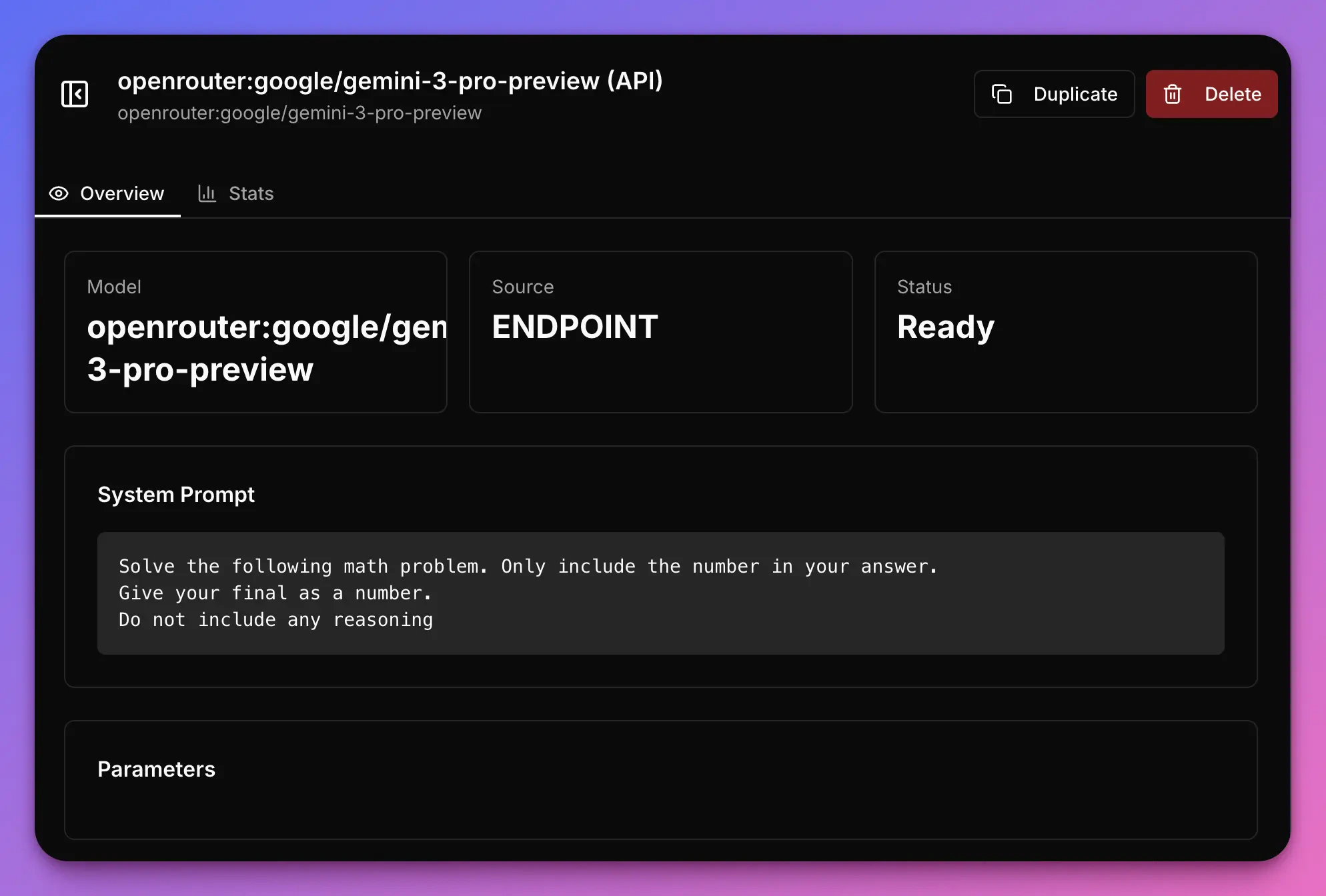 Now, in [Platform -> A/B Tests -> Settings](https://narev.ai/application), you will be able to select other variants to compare against the Source of Truth variant.
Having selected the first model (Gemini Pro 3), Narev will recommend other alternatives to test. For example, `Deepseek-v3.2-Speciale` is an alternative for the `Gemini 3 Pro Preview`. Then I looked for an alternative for the Deepseek model, and so on and so forth.
Now, in [Platform -> A/B Tests -> Settings](https://narev.ai/application), you will be able to select other variants to compare against the Source of Truth variant.
Having selected the first model (Gemini Pro 3), Narev will recommend other alternatives to test. For example, `Deepseek-v3.2-Speciale` is an alternative for the `Gemini 3 Pro Preview`. Then I looked for an alternative for the Deepseek model, and so on and so forth.
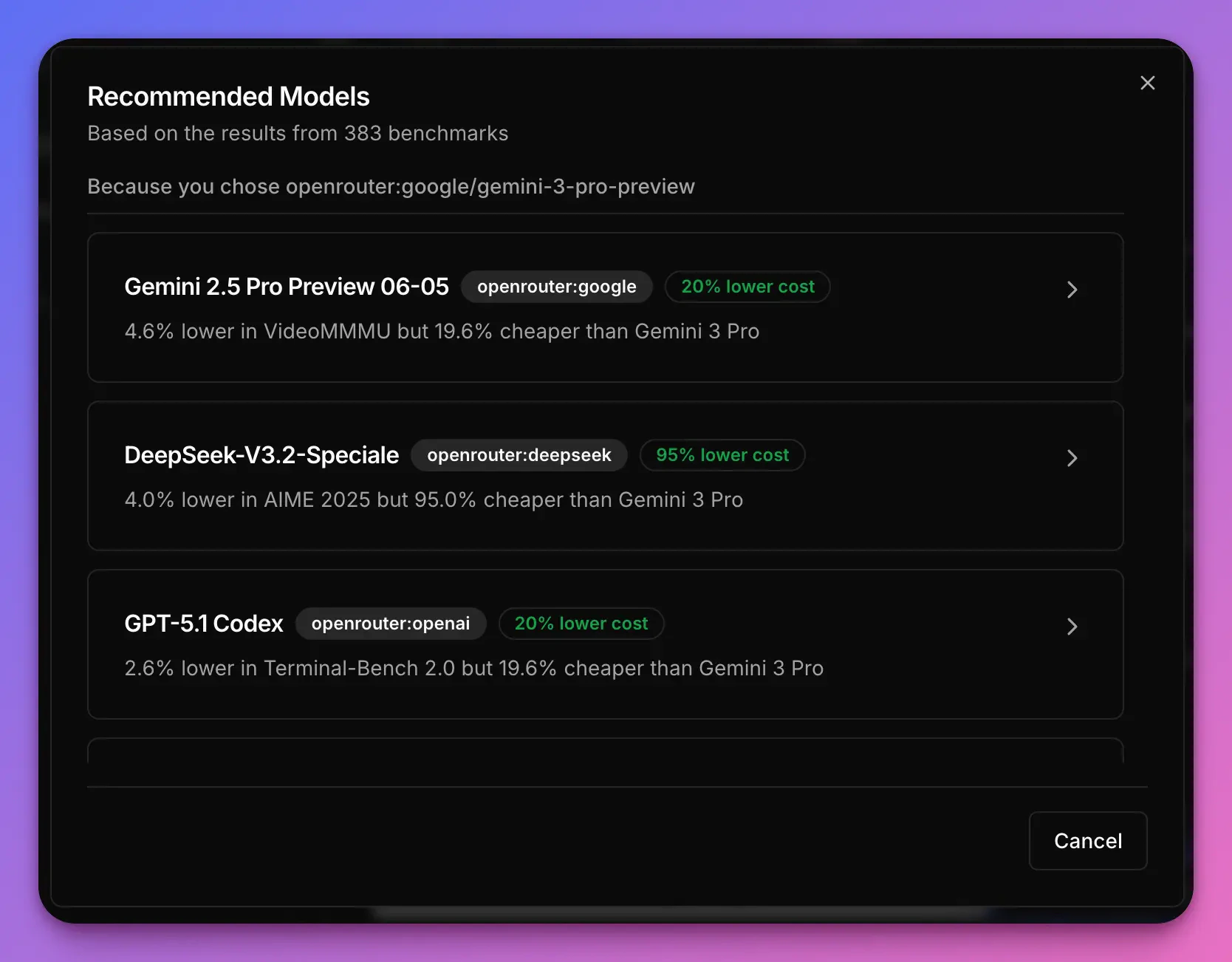 Narev's recommendation engine takes into account the performance of over 400 models and recommends those that achieve
similar performance but offer significantly lower price or latency.
Finally, I ended with the following variants (with the same system prompt):
* **Gemini 3 Pro Preview** - our first model, tagged as state of the art,
* **DeepSeek v3.2 Speciale** - flagship model from the DeepSeek team
* **GPT-5 Nano** - recommended by Narev as a competitor performing in the benchmark similarly to the DeepSeek's model
* **Llama 3 70B Instruct** - great open source model that I tried in many experiments in the past
* **Ministral 3B** - tiny, powerful model, from Narev's recommendations
### Part 2: Select the Source of Truth model and the Quality Metric
Since we don't have labels of what the correct response is, we can rely on a proprietary State of Art model and treat it as the truth.
In order to do that I've selected the model that I used in the notebooks - Gemini 3 Pro Preview.
Narev's recommendation engine takes into account the performance of over 400 models and recommends those that achieve
similar performance but offer significantly lower price or latency.
Finally, I ended with the following variants (with the same system prompt):
* **Gemini 3 Pro Preview** - our first model, tagged as state of the art,
* **DeepSeek v3.2 Speciale** - flagship model from the DeepSeek team
* **GPT-5 Nano** - recommended by Narev as a competitor performing in the benchmark similarly to the DeepSeek's model
* **Llama 3 70B Instruct** - great open source model that I tried in many experiments in the past
* **Ministral 3B** - tiny, powerful model, from Narev's recommendations
### Part 2: Select the Source of Truth model and the Quality Metric
Since we don't have labels of what the correct response is, we can rely on a proprietary State of Art model and treat it as the truth.
In order to do that I've selected the model that I used in the notebooks - Gemini 3 Pro Preview.
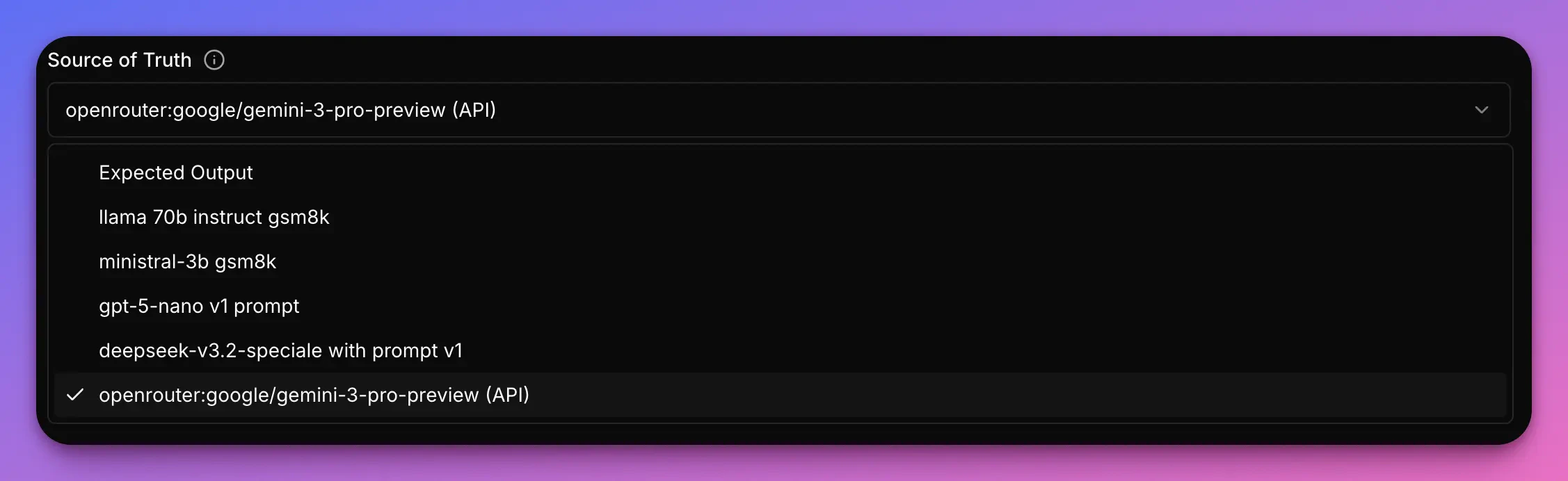 And finally I selected the quality metric. The best one of this case is an LLM binary.
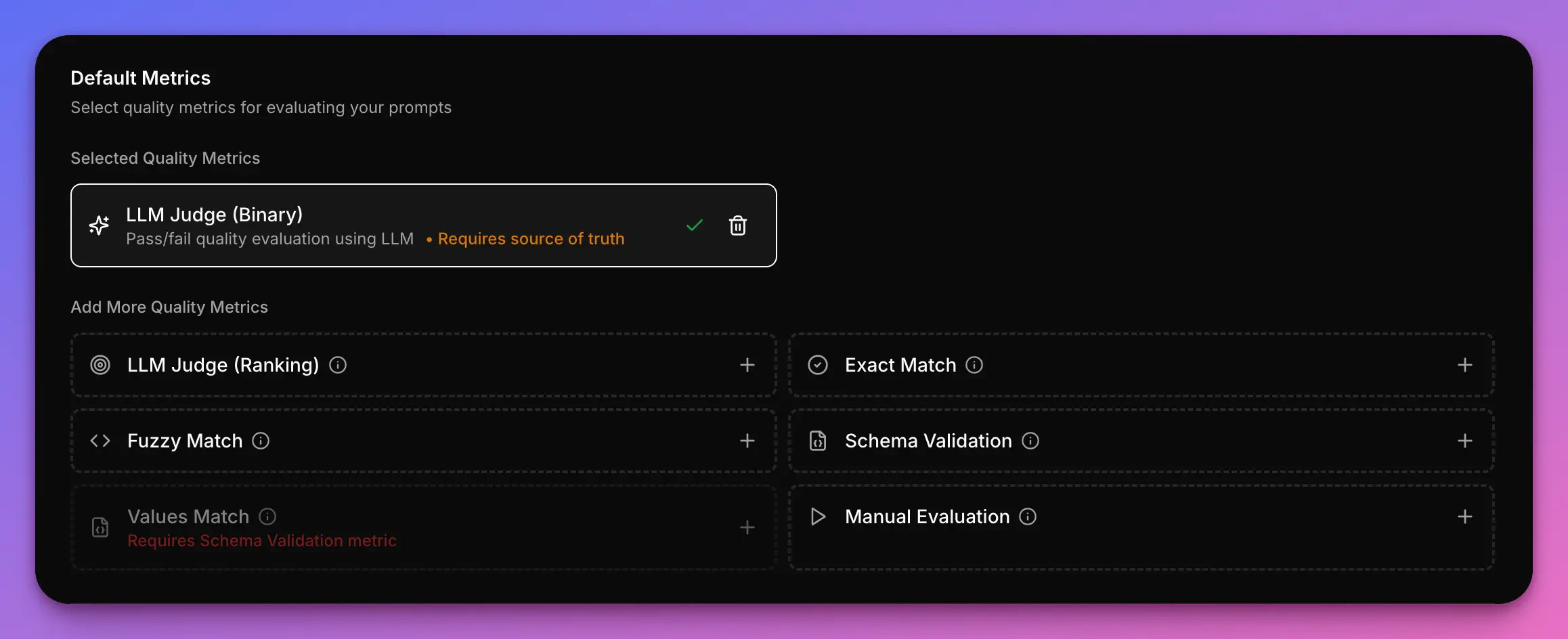 ### Part 3: Run the experiment
All that is left at this point, is running the actual experiment.
If all the items in the checklist have a tick, it's the time to click on **Run** and wait for the experiment to complete.
## Analyzing the results
The Narev platform evaluated all variants against the baseline model. Results are based on 50 test prompts from the GSM8K math reasoning benchmark
Your results will vary depending on your specific use case. Math reasoning tasks may differ significantly from other
applications like summarization, code generation, or creative writing.
| Variant | Cost/1M | vs Baseline | Latency | vs Baseline | Quality | vs Baseline |
| ------------------------------- | ---------- | ----------- | -------- | ----------- | --------- | ----------- |
| Gemini 3 Pro Preview (Baseline) | \$8,790.10 | - | 9,845ms | - | 100.0% | - |
| DeepSeek v3.2 Speciale | \$238.02 | **-97.3%** | 13,223ms | +34.3% | **98.1%** | -1.9% |
| GPT-5 Nano | \$140.81 | **-98.4%** | 6,611ms | **-32.8%** | **96.2%** | -3.8% |
| Llama 3 70B Instruct | \$30.72 | -99.7% | 865ms | -91.2% | 29.5% | -70.5% |
| Ministral 3B | \$3.93 | -100.0% | 733ms | -92.6% | 6.7% | -93.3% |
## Key insights from the benchmark
After running this benchmark, we discovered:
1. **Quality-Cost tradeoff**: DeepSeek v3.2 Speciale delivers 98.1% of baseline quality at only 2.7% of the cost—saving \$8,552 per million tokens
2. **Latency considerations**: While cheaper, DeepSeek is 34% slower than baseline. For latency-critical applications, this tradeoff matters
3. **Task alignment matters**: Smaller models (Llama 3 70B, Ministral 3B) showed poor performance on math reasoning, demonstrating that model capabilities must match task complexity
**For this specific math reasoning task**, DeepSeek v3.2 Speciale offers the best balance, maintaining near-baseline quality while dramatically reducing costs.
The most helpful view for me is the Optimization Recommendation from the Narev platform (it's available at `A/B Tests` -> `Results` -> `Summary`). Here we can see the best alternative for each optimization category: Quality, Cost and Latency.
### Part 3: Run the experiment
All that is left at this point, is running the actual experiment.
If all the items in the checklist have a tick, it's the time to click on **Run** and wait for the experiment to complete.
## Analyzing the results
The Narev platform evaluated all variants against the baseline model. Results are based on 50 test prompts from the GSM8K math reasoning benchmark
Your results will vary depending on your specific use case. Math reasoning tasks may differ significantly from other
applications like summarization, code generation, or creative writing.
| Variant | Cost/1M | vs Baseline | Latency | vs Baseline | Quality | vs Baseline |
| ------------------------------- | ---------- | ----------- | -------- | ----------- | --------- | ----------- |
| Gemini 3 Pro Preview (Baseline) | \$8,790.10 | - | 9,845ms | - | 100.0% | - |
| DeepSeek v3.2 Speciale | \$238.02 | **-97.3%** | 13,223ms | +34.3% | **98.1%** | -1.9% |
| GPT-5 Nano | \$140.81 | **-98.4%** | 6,611ms | **-32.8%** | **96.2%** | -3.8% |
| Llama 3 70B Instruct | \$30.72 | -99.7% | 865ms | -91.2% | 29.5% | -70.5% |
| Ministral 3B | \$3.93 | -100.0% | 733ms | -92.6% | 6.7% | -93.3% |
## Key insights from the benchmark
After running this benchmark, we discovered:
1. **Quality-Cost tradeoff**: DeepSeek v3.2 Speciale delivers 98.1% of baseline quality at only 2.7% of the cost—saving \$8,552 per million tokens
2. **Latency considerations**: While cheaper, DeepSeek is 34% slower than baseline. For latency-critical applications, this tradeoff matters
3. **Task alignment matters**: Smaller models (Llama 3 70B, Ministral 3B) showed poor performance on math reasoning, demonstrating that model capabilities must match task complexity
**For this specific math reasoning task**, DeepSeek v3.2 Speciale offers the best balance, maintaining near-baseline quality while dramatically reducing costs.
The most helpful view for me is the Optimization Recommendation from the Narev platform (it's available at `A/B Tests` -> `Results` -> `Summary`). Here we can see the best alternative for each optimization category: Quality, Cost and Latency.
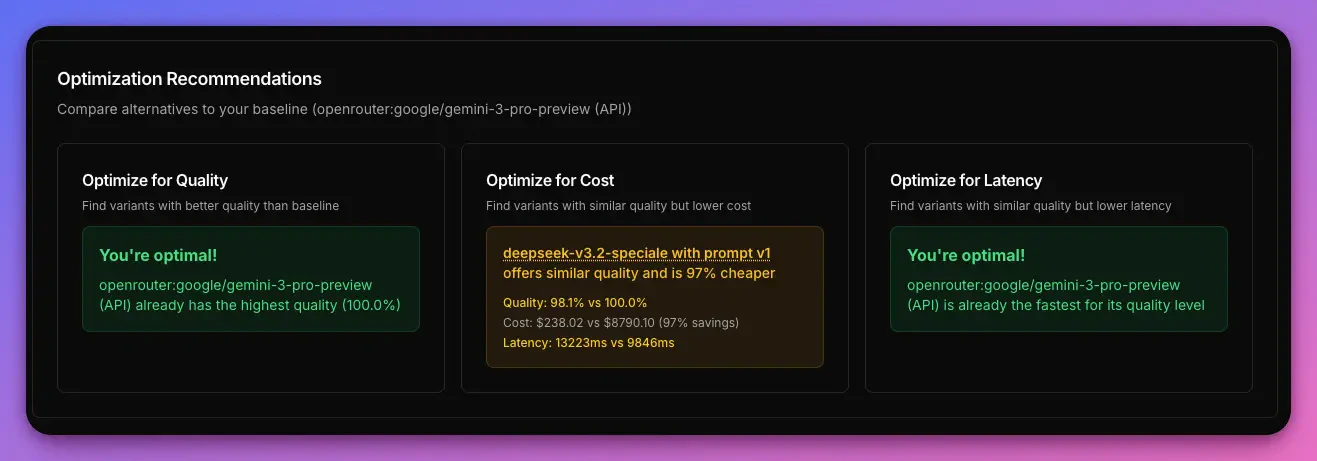 Let's break down this recommendation. We selected **Gemini 3 Pro Preview** as both our State of Art model and the Baseline.
* **Quality** - We're at the optimal spot (this means that there is no variant with a higher quality). Great source of truth. Truly a state of art model.
* **Cost** - We have one recommendation. It says that IF we were able to sacrifice 1.9% of quality, we **COULD** save 97% in token cost by choosing **DeepSeek v3.2 Speciale**
* **Latency** - For a model with this level of quality, there is no quicker model than that.
Let's break down this recommendation. We selected **Gemini 3 Pro Preview** as both our State of Art model and the Baseline.
* **Quality** - We're at the optimal spot (this means that there is no variant with a higher quality). Great source of truth. Truly a state of art model.
* **Cost** - We have one recommendation. It says that IF we were able to sacrifice 1.9% of quality, we **COULD** save 97% in token cost by choosing **DeepSeek v3.2 Speciale**
* **Latency** - For a model with this level of quality, there is no quicker model than that.
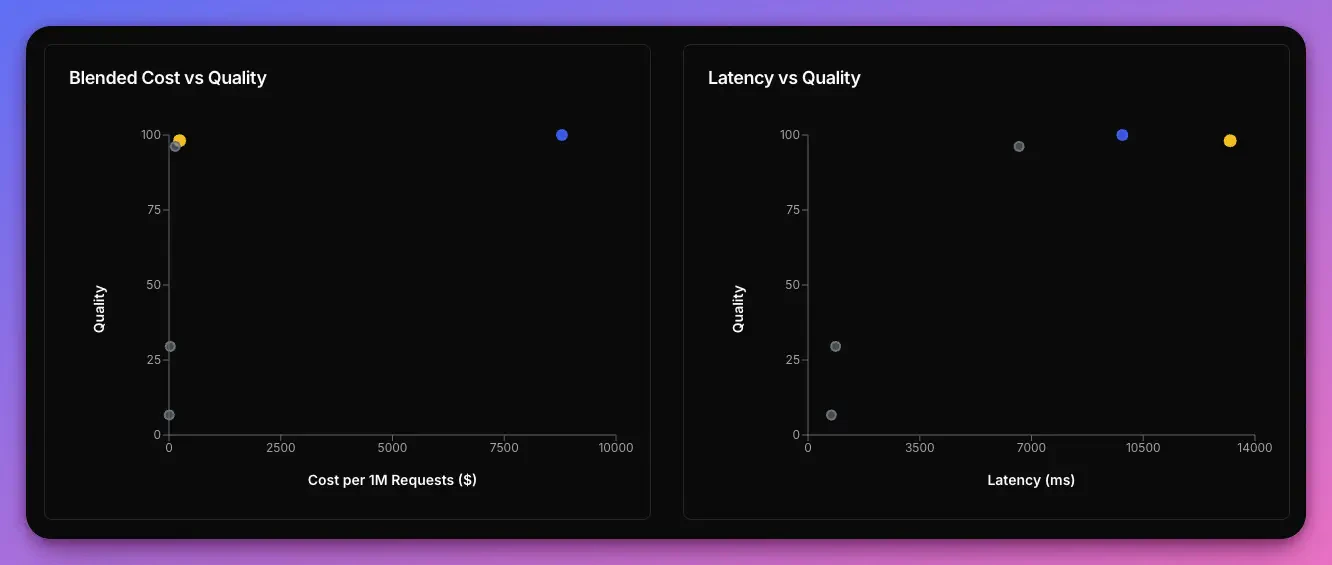 The chart helps see the tradeoff. The baseline in blue (Gemini 3 Pro Preview) vs the Cost alternative in amber (DeepSeek v3.2 Speciale). On the chart on the left hand side we see that as we move to the left (cheaper model) we're staying at the same level of quality.
In production, choosing the DeepSeek model could be significant savings (in this case it's a $238 per 1M/requests vs $8790 per 1M requests).
## Deploying to production
Once you've identified your optimal model, deployment is straightforward:
1. In the Narev dashboard, set your chosen variant (e.g., DeepSeek v3.2 Speciale) as the production variant
2. Continue using the same endpoint from Part 1: `https://www.narev.ai/api/applications//v1`
3. When you don't specify a model in your requests, Narev automatically routes to your production variant
```python theme={null}
# No model specified - automatically uses your production variant
response = requests.post(
url=f"{NAREV_BASE_URL}/chat/completions",
headers={"Authorization": f"Bearer {NAREV_API_KEY}"},
json={
"messages": [{"role": "user", "content": "What is 25 * 17?"}]
}
)
```
You can update your production variant anytime without changing your code. This enables seamless A/B testing and model
upgrades in production.
## Resources
* [Narev Platform Documentation](/)
* [Benchmark concepts](/platform/concepts/benchmarks)
* [Data Source Options](/platform/benchmark/create)
* [Understanding evaluation metrics](/platform/concepts/quality-evaluations)
* [GSM8K Benchmark Dataset](https://huggingface.co/datasets/openai/gsm8k)
## Next steps
* Try with your own prompts and use case
* Experiment with different system prompts to optimize further
* [Explore prompt optimization techniques](/guides/reduce-cost-by-prompt-engineering)
The chart helps see the tradeoff. The baseline in blue (Gemini 3 Pro Preview) vs the Cost alternative in amber (DeepSeek v3.2 Speciale). On the chart on the left hand side we see that as we move to the left (cheaper model) we're staying at the same level of quality.
In production, choosing the DeepSeek model could be significant savings (in this case it's a $238 per 1M/requests vs $8790 per 1M requests).
## Deploying to production
Once you've identified your optimal model, deployment is straightforward:
1. In the Narev dashboard, set your chosen variant (e.g., DeepSeek v3.2 Speciale) as the production variant
2. Continue using the same endpoint from Part 1: `https://www.narev.ai/api/applications//v1`
3. When you don't specify a model in your requests, Narev automatically routes to your production variant
```python theme={null}
# No model specified - automatically uses your production variant
response = requests.post(
url=f"{NAREV_BASE_URL}/chat/completions",
headers={"Authorization": f"Bearer {NAREV_API_KEY}"},
json={
"messages": [{"role": "user", "content": "What is 25 * 17?"}]
}
)
```
You can update your production variant anytime without changing your code. This enables seamless A/B testing and model
upgrades in production.
## Resources
* [Narev Platform Documentation](/)
* [Benchmark concepts](/platform/concepts/benchmarks)
* [Data Source Options](/platform/benchmark/create)
* [Understanding evaluation metrics](/platform/concepts/quality-evaluations)
* [GSM8K Benchmark Dataset](https://huggingface.co/datasets/openai/gsm8k)
## Next steps
* Try with your own prompts and use case
* Experiment with different system prompts to optimize further
* [Explore prompt optimization techniques](/guides/reduce-cost-by-prompt-engineering)