> ## Documentation Index
> Fetch the complete documentation index at: https://narev.ai/docs/llms.txt
> Use this file to discover all available pages before exploring further.
# How we cut Dagster Cloud credits by 60% by collapsing dbt assets
> Learn how we reduced our bill after the May 2026 pricing changes by collapsing our dbt project into a single asset.
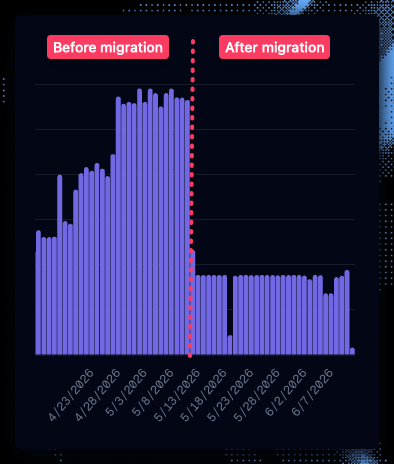 In May 2026, [Dagster removed the monthly credit allowance](https://support.dagster.io/articles/3171123463-dagster-solo-and-starter-pricing-updates-may-2026) from its Solo and Starter tiers.
The change meant Dagster now charged one credit for each step-executed asset materialization, per partition.
For teams that used those credits, the change wasn't small.
A Solo workspace that previously used the full 7,500-credit allowance could go from \$10 per month to \$310 per month.
A Starter workspace using 30,000 credits could go from \$100/month to \$1,150/month.
With only a few weeks to react, teams started weighing switching to a self-hosted Dagster, or even migrating to a different orchestrator altogether.
## Our take
At Narev, we build a Full-Stack AI FinOps Ecosystem, so we spend a lot of time thinking about the cost of running infrastructure.
We do like the convenience of Dagster, but our 24/7 schedule quickly drove up our bill.
It actually became more expensive to run Dagster than to run a self-hosted Airflow.
But before committing to a new orchestrator, we wanted to understand any quick wins we could get by optimizing our Dagster setup.
### We found the biggest savings in the DBT (data build tool) assets
When we looked at our own Dagster usage, the expensive part wasn't dbt itself. It was the way the official `dagster-dbt` integration maps dbt nodes into Dagster assets.
The standard pattern uses `@dbt_assets`, which maps dbt models, and in some setups seeds, snapshots, or sources, into many Dagster graph nodes. That's useful if you need model-level lineage in the Dagster UI.
But with the new pricing, **each asset materialization has an orchestration cost** (\$0.035 to \$0.040 per credit, plus compute time).
When you have hundreds of dbt models running hourly across partitions, you **will** end up paying Dagster to coordinate a graph that dbt already understands.
We fixed our setup by collapsing the entire dbt project into **one Dagster asset**. Same dbt logic. Same data. Far fewer orchestration steps.
## The problem: `@dbt_assets` multiplies your bill
Here is what we started with: the standard pattern from the [Dagster dbt integration docs](https://docs.dagster.io/integrations/dbt):
```python highlight={13-17} theme={null}
from dagster import AssetExecutionContext, AssetsDefinition
from dagster_dbt import DbtCliResource, dbt_assets
from etl.defs import loaders
from etl.defs.partitions import daily_partition
from etl.defs.project import dbt_project
from etl.defs.utils import DbtTranslator, DeploymentType, get_deployment_type
loader_deps = [
obj for obj in loaders.__dict__.values() if isinstance(obj, AssetsDefinition)
]
@dbt_assets(
manifest=dbt_project.manifest_path,
dagster_dbt_translator=DbtTranslator(),
partitions_def=daily_partition,
)
def dbt_models(context: AssetExecutionContext, dbt_resource: DbtCliResource):
time_window = context.partition_time_window
deployment = get_deployment_type()
dbt_target = "prod" if deployment == DeploymentType.PROD else "dev"
dbt_vars = {
"start_date": time_window.start.strftime("%Y-%m-%d"),
"end_date": time_window.end.strftime("%Y-%m-%d"),
}
args = ["build", "--target", dbt_target, "--vars", json.dumps(dbt_vars)]
yield from dbt_resource.cli(args, context=context).stream()
```
This looked very clean. But the billing side effect was significant:
1. **`@dbt_assets` registers many Dagster graph nodes from your dbt project**: Models, and in some setups seeds, snapshots, or sources, expand into Dagster assets. We had hundreds of warehouse views, which meant hundreds of assets in the Dagster graph running hourly.
2. **`.stream()` with `context=context` emits per-model materialization events**: Dagster records each dbt model as a separate materialization, even though dbt runs them in a single CLI invocation.
A similar problem existed upstream.
Individual loader assets each ran as a separate Dagster step.
Our daily ETL job was coordinating **hundreds of assets** for work that was really just "load raw tables, then run dbt build."
## The fix: One asset, one command, one materialization
We replaced `@dbt_assets` with a plain `@asset` that shells out to dbt:
```python highlight={10-14} theme={null}
import json
from dagster import AssetExecutionContext, asset
from dagster_dbt import DbtCliResource
from etl.defs.partitions import daily_partition
from etl.defs.utils import DeploymentType, get_deployment_type
@asset(
partitions_def=daily_partition,
group_name="transformers",
deps=["dw_load"],
)
def dw_transform(context: AssetExecutionContext, dbt_resource: DbtCliResource):
time_window = context.partition_time_window
deployment = get_deployment_type()
dbt_target = "prod" if deployment == DeploymentType.PROD else "dev"
dbt_vars = {
"start_date": time_window.start.strftime("%Y-%m-%d"),
"end_date": time_window.end.strftime("%Y-%m-%d"),
}
args = ["build", "--target", dbt_target, "--vars", json.dumps(dbt_vars)]
result = dbt_resource.cli(args).wait()
if not result.is_successful():
raise Exception("dbt build failed")
return "All models updated"
```
Three details matter:
| Detail | Why it matters for cost optimization |
| ------------------------------------ | ------------------------------------------------------- |
| `@asset` instead of `@dbt_assets` | One asset in the graph, not hundreds |
| `.wait()` instead of `.stream()` | Blocks until dbt finishes; no per-model event streaming |
| **No `context=context` in `.cli()`** | Critical for saving credits. See below. |
## The gotcha: `context=context` defeats the whole point
Our first version of the single-asset approach still passed `context` to the CLI:
```python theme={null}
# Do not do this if you want to save Dagster credits
result = dbt_resource.cli(args, context=context).wait()
```
**Do not pass `context=context` to `dbt_resource.cli()`** if your goal is to save credits. Even inside a single `@asset`, this tells `dagster-dbt` to emit individual materialization events for each dbt model. You end up paying for per-model orchestration without getting per-model assets.
The fix is one line:
```python theme={null}
result = dbt_resource.cli(args).wait()
```
No context, no per-model events, one materialization per partition per day.
## Wiring it into jobs and downstream assets
Your job selection simplifies too. Before, we targeted a specific multi-asset definition:
```python highlight={4} theme={null}
etl_job = dg.define_asset_job(
name="etl_job",
selection=(
dg.AssetSelection.groups("loaders") | dg.AssetSelection.assets(dbt_models)
),
# ...
)
```
After:
```python highlight={4} theme={null}
etl_job = dg.define_asset_job(
name="etl_job",
selection=(
dg.AssetSelection.groups("loaders") | dg.AssetSelection.groups("transformers")
),
#...
)
```
Downstream assets that previously depended on individual dbt output models now depend on the single transform asset:
```python highlight={5} theme={null}
@dg.asset(
deps=[dg.AssetKey(["dw_transform"])],
)
def clickhouse_report_alerts(
context: dg.AssetExecutionContext, clickhouse_resource: ClickHouseResource
) -> pd.DataFrame:
client = clickhouse_resource.get_client()
# ... query the table dbt already built in ClickHouse
```
The activator does not care which dbt models ran. It reads from the table in the warehouse. dbt did its job. Dagster just needed to know "transform is done."
## ETL: Before and after
```text theme={null}
BEFORE AFTER
───────────────────────────────────── ─────────────────────────────────
extract_* + load_* (many assets) extract_* + load_* (many assets, unchanged)
│ │
▼ ▼
... (many loader assets) dw_transform (1 asset, dbt build)
│ │
▼ ▼
... (many dbt assets) activators (depend on dw_transform)
```
## The trade-offs
This is not a free optimization. By collapsing our pipeline, we gave up a few Dagster features. Be honest about these trade-offs before adopting this pattern:
1. **No per-model lineage in Dagster**: You will not see `staging/_stg_openrouter` as its own node in the asset graph. Use dbt docs, Elementary, or your warehouse for model-level lineage.
2. **No per-model Dagster alerting**: If one dbt model fails, the whole `dw_transform` asset fails. dbt logs still tell you which model broke; you just do not get a Dagster alert scoped to that specific model.
3. **Coarser observability**: One green checkmark for the entire transform layer instead of hundreds.
For many teams, **dbt already owns transform observability**. Dagster's job is orchestration: "extract done → load done → transform done → activate." You may not need your orchestrator to also be your catalog.
## When to keep `@dbt_assets`
The multi-asset pattern is still the right choice if:
* You are on **Dagster Cloud Hybrid or self-hosted** where orchestration cost is not billed per-step.
* You are heavily leveraging **Dagster 1.13's virtual assets** (which do not consume credits).
* You absolutely need **Dagster-native lineage** across dbt models and non-dbt assets at the model level.
* Different dbt models have **different schedules or owners** and genuinely need independent materialization.
* Your dbt project is **small** (under \~15 models) and the cost difference is negligible.
But if you are on Dagster Cloud with a large dbt project and a predictable "run everything daily" pattern, the single-asset approach is likely cheaper.
## Dagster cost optimization checklist
If you want to try this pattern, copy this prompt into Cursor:
Audit this Dagster project for credit optimization opportunities. Replace `@dbt_assets` with a single `@asset` running `dbt build`, use `.wait()` instead of `.stream()`, and don't pass `context=context` to `dbt_resource.cli()`. Update downstream `deps` to point at the single transform asset, update job `AssetSelection` to use asset groups instead of the old multi-asset definition, and keep dbt tests in the `build` command. Also check whether repetitive loader or ingestion assets can use the same consolidation pattern.
We're building open-source FinOps tooling to make cost surprises like this visible earlier across AI model pricing and infrastructure data.
In May 2026, [Dagster removed the monthly credit allowance](https://support.dagster.io/articles/3171123463-dagster-solo-and-starter-pricing-updates-may-2026) from its Solo and Starter tiers.
The change meant Dagster now charged one credit for each step-executed asset materialization, per partition.
For teams that used those credits, the change wasn't small.
A Solo workspace that previously used the full 7,500-credit allowance could go from \$10 per month to \$310 per month.
A Starter workspace using 30,000 credits could go from \$100/month to \$1,150/month.
With only a few weeks to react, teams started weighing switching to a self-hosted Dagster, or even migrating to a different orchestrator altogether.
## Our take
At Narev, we build a Full-Stack AI FinOps Ecosystem, so we spend a lot of time thinking about the cost of running infrastructure.
We do like the convenience of Dagster, but our 24/7 schedule quickly drove up our bill.
It actually became more expensive to run Dagster than to run a self-hosted Airflow.
But before committing to a new orchestrator, we wanted to understand any quick wins we could get by optimizing our Dagster setup.
### We found the biggest savings in the DBT (data build tool) assets
When we looked at our own Dagster usage, the expensive part wasn't dbt itself. It was the way the official `dagster-dbt` integration maps dbt nodes into Dagster assets.
The standard pattern uses `@dbt_assets`, which maps dbt models, and in some setups seeds, snapshots, or sources, into many Dagster graph nodes. That's useful if you need model-level lineage in the Dagster UI.
But with the new pricing, **each asset materialization has an orchestration cost** (\$0.035 to \$0.040 per credit, plus compute time).
When you have hundreds of dbt models running hourly across partitions, you **will** end up paying Dagster to coordinate a graph that dbt already understands.
We fixed our setup by collapsing the entire dbt project into **one Dagster asset**. Same dbt logic. Same data. Far fewer orchestration steps.
## The problem: `@dbt_assets` multiplies your bill
Here is what we started with: the standard pattern from the [Dagster dbt integration docs](https://docs.dagster.io/integrations/dbt):
```python highlight={13-17} theme={null}
from dagster import AssetExecutionContext, AssetsDefinition
from dagster_dbt import DbtCliResource, dbt_assets
from etl.defs import loaders
from etl.defs.partitions import daily_partition
from etl.defs.project import dbt_project
from etl.defs.utils import DbtTranslator, DeploymentType, get_deployment_type
loader_deps = [
obj for obj in loaders.__dict__.values() if isinstance(obj, AssetsDefinition)
]
@dbt_assets(
manifest=dbt_project.manifest_path,
dagster_dbt_translator=DbtTranslator(),
partitions_def=daily_partition,
)
def dbt_models(context: AssetExecutionContext, dbt_resource: DbtCliResource):
time_window = context.partition_time_window
deployment = get_deployment_type()
dbt_target = "prod" if deployment == DeploymentType.PROD else "dev"
dbt_vars = {
"start_date": time_window.start.strftime("%Y-%m-%d"),
"end_date": time_window.end.strftime("%Y-%m-%d"),
}
args = ["build", "--target", dbt_target, "--vars", json.dumps(dbt_vars)]
yield from dbt_resource.cli(args, context=context).stream()
```
This looked very clean. But the billing side effect was significant:
1. **`@dbt_assets` registers many Dagster graph nodes from your dbt project**: Models, and in some setups seeds, snapshots, or sources, expand into Dagster assets. We had hundreds of warehouse views, which meant hundreds of assets in the Dagster graph running hourly.
2. **`.stream()` with `context=context` emits per-model materialization events**: Dagster records each dbt model as a separate materialization, even though dbt runs them in a single CLI invocation.
A similar problem existed upstream.
Individual loader assets each ran as a separate Dagster step.
Our daily ETL job was coordinating **hundreds of assets** for work that was really just "load raw tables, then run dbt build."
## The fix: One asset, one command, one materialization
We replaced `@dbt_assets` with a plain `@asset` that shells out to dbt:
```python highlight={10-14} theme={null}
import json
from dagster import AssetExecutionContext, asset
from dagster_dbt import DbtCliResource
from etl.defs.partitions import daily_partition
from etl.defs.utils import DeploymentType, get_deployment_type
@asset(
partitions_def=daily_partition,
group_name="transformers",
deps=["dw_load"],
)
def dw_transform(context: AssetExecutionContext, dbt_resource: DbtCliResource):
time_window = context.partition_time_window
deployment = get_deployment_type()
dbt_target = "prod" if deployment == DeploymentType.PROD else "dev"
dbt_vars = {
"start_date": time_window.start.strftime("%Y-%m-%d"),
"end_date": time_window.end.strftime("%Y-%m-%d"),
}
args = ["build", "--target", dbt_target, "--vars", json.dumps(dbt_vars)]
result = dbt_resource.cli(args).wait()
if not result.is_successful():
raise Exception("dbt build failed")
return "All models updated"
```
Three details matter:
| Detail | Why it matters for cost optimization |
| ------------------------------------ | ------------------------------------------------------- |
| `@asset` instead of `@dbt_assets` | One asset in the graph, not hundreds |
| `.wait()` instead of `.stream()` | Blocks until dbt finishes; no per-model event streaming |
| **No `context=context` in `.cli()`** | Critical for saving credits. See below. |
## The gotcha: `context=context` defeats the whole point
Our first version of the single-asset approach still passed `context` to the CLI:
```python theme={null}
# Do not do this if you want to save Dagster credits
result = dbt_resource.cli(args, context=context).wait()
```
**Do not pass `context=context` to `dbt_resource.cli()`** if your goal is to save credits. Even inside a single `@asset`, this tells `dagster-dbt` to emit individual materialization events for each dbt model. You end up paying for per-model orchestration without getting per-model assets.
The fix is one line:
```python theme={null}
result = dbt_resource.cli(args).wait()
```
No context, no per-model events, one materialization per partition per day.
## Wiring it into jobs and downstream assets
Your job selection simplifies too. Before, we targeted a specific multi-asset definition:
```python highlight={4} theme={null}
etl_job = dg.define_asset_job(
name="etl_job",
selection=(
dg.AssetSelection.groups("loaders") | dg.AssetSelection.assets(dbt_models)
),
# ...
)
```
After:
```python highlight={4} theme={null}
etl_job = dg.define_asset_job(
name="etl_job",
selection=(
dg.AssetSelection.groups("loaders") | dg.AssetSelection.groups("transformers")
),
#...
)
```
Downstream assets that previously depended on individual dbt output models now depend on the single transform asset:
```python highlight={5} theme={null}
@dg.asset(
deps=[dg.AssetKey(["dw_transform"])],
)
def clickhouse_report_alerts(
context: dg.AssetExecutionContext, clickhouse_resource: ClickHouseResource
) -> pd.DataFrame:
client = clickhouse_resource.get_client()
# ... query the table dbt already built in ClickHouse
```
The activator does not care which dbt models ran. It reads from the table in the warehouse. dbt did its job. Dagster just needed to know "transform is done."
## ETL: Before and after
```text theme={null}
BEFORE AFTER
───────────────────────────────────── ─────────────────────────────────
extract_* + load_* (many assets) extract_* + load_* (many assets, unchanged)
│ │
▼ ▼
... (many loader assets) dw_transform (1 asset, dbt build)
│ │
▼ ▼
... (many dbt assets) activators (depend on dw_transform)
```
## The trade-offs
This is not a free optimization. By collapsing our pipeline, we gave up a few Dagster features. Be honest about these trade-offs before adopting this pattern:
1. **No per-model lineage in Dagster**: You will not see `staging/_stg_openrouter` as its own node in the asset graph. Use dbt docs, Elementary, or your warehouse for model-level lineage.
2. **No per-model Dagster alerting**: If one dbt model fails, the whole `dw_transform` asset fails. dbt logs still tell you which model broke; you just do not get a Dagster alert scoped to that specific model.
3. **Coarser observability**: One green checkmark for the entire transform layer instead of hundreds.
For many teams, **dbt already owns transform observability**. Dagster's job is orchestration: "extract done → load done → transform done → activate." You may not need your orchestrator to also be your catalog.
## When to keep `@dbt_assets`
The multi-asset pattern is still the right choice if:
* You are on **Dagster Cloud Hybrid or self-hosted** where orchestration cost is not billed per-step.
* You are heavily leveraging **Dagster 1.13's virtual assets** (which do not consume credits).
* You absolutely need **Dagster-native lineage** across dbt models and non-dbt assets at the model level.
* Different dbt models have **different schedules or owners** and genuinely need independent materialization.
* Your dbt project is **small** (under \~15 models) and the cost difference is negligible.
But if you are on Dagster Cloud with a large dbt project and a predictable "run everything daily" pattern, the single-asset approach is likely cheaper.
## Dagster cost optimization checklist
If you want to try this pattern, copy this prompt into Cursor:
Audit this Dagster project for credit optimization opportunities. Replace `@dbt_assets` with a single `@asset` running `dbt build`, use `.wait()` instead of `.stream()`, and don't pass `context=context` to `dbt_resource.cli()`. Update downstream `deps` to point at the single transform asset, update job `AssetSelection` to use asset groups instead of the old multi-asset definition, and keep dbt tests in the `build` command. Also check whether repetitive loader or ingestion assets can use the same consolidation pattern.
We're building open-source FinOps tooling to make cost surprises like this visible earlier across AI model pricing and infrastructure data.